
In 2025, testing software isn't just about finding bugs — it's about working smarter. With the rise of powerful and accessible AI tools, Vibe coders now have the opportunity to test faster, more efficiently, and with fewer headaches. AI testing tools are driving this transformation. These tools go beyond basic automation — they can detect edge cases, write test scripts, debug in real time, and even suggest fixes or improvements. In this list, we’ll explore the top 10 AI testing tools every modern developer should know.
Whether you're coding a quick prototype or managing a large-scale project, having the right AI assistant in your workflow can make a huge difference. That’s why we’ve put together this list of 20 must-try AI coding agents. From full-stack builders to browser automators and IDE companions, these tools are shaping the future of development and you’ll want to know about them.
Build APIs Faster with Apidog Say goodbye to tab-switching. If you are working with APIs Apidog connects your API documentation directly with your AI assistant—so you can generate, test, and maintain APIs in one smooth flow.

Why You Should Care About AI Coding Agents
The software development world is moving faster than ever, and traditional coding methods alone can’t keep up with the scale and speed demanded in 2025. That’s where AI coding agents come in. These tools are more than just trend pieces—they're practical solutions that are actively transforming how we build, test, and deploy software.
Whether you’re a beginner learning the ropes or a senior developer managing complex systems, AI agents help you:
- Automate repetitive tasks like code generation, debugging, and testing.
- Understand large codebases faster by offering summaries and runtime context.
- Prototype full-stack applications in minutes using natural language.
- Collaborate more efficiently with AI acting like a pair programmer.
AI coding agents free up developers to focus on logic and creativity, not syntax and structure. Ignoring them now means falling behind, especially as more teams adopt AI-powered development workflows to ship products faster, with fewer bugs.
In short—these aren’t just cool tools. They’re becoming essential to staying competitive in today’s development landscape.
1. Trae

Overview: Developed by ByteDance, Trae is an AI-powered coding assistant that facilitates full-stack web application development through intuitive prompting.
Key Features:
- Supports end-to-end web app creation
- Built on VS Code with a polished UI
- Dual chat interfaces for enhanced interaction
- Comprehensive context system with automatic indexing
- Supports multimodal input, including images
Ideal For: Developers seeking a free, versatile tool for rapid web application development.
2. Cline

Overview: Cline is a VC code plugin designed to handle large codebases efficiently, offering runtime awareness and compatibility with various large language models (LLMs).
Key Features:
- Efficient management of extensive codebases
- Supports multiple LLMs
- Provides runtime context for better code suggestions
Ideal For: Developers working on complex projects requiring robust code management and AI assistance.
3. Databutton

Overview: Originating from Norway, Databutton offers a unique approach to coding, catering especially to non-coders by simplifying the development process.
Key Features:
- User-friendly interface for non-coders
- Step-by-step guidance for application development
- Backed by experienced VCs
Ideal For: Individuals without a coding background looking to develop applications effortlessly.
4. Continue.dev

Overview: An open-source alternative to Cursor, Continue.dev empowers developers to build their own AI-integrated IDEs, offering flexibility and customization.
Key Features:
- Open-source and customizable
- Ideal for building personalized AI IDEs
- Active community support
Ideal For: Developers interested in creating tailored AI development environments.
5. Base44

Overview: Base44 is designed for non-coders, enabling the creation of dashboard-like applications with ease, streamlining the development process.
Key Features:
- No-code platform for dashboard creation
- Intuitive drag-and-drop interface
- Pre-built templates for quick deployment
Ideal For: Business users and analysts aiming to develop dashboards without coding.
6. Cursor

Overview: Cursor is an AI-first code editor that integrates seamlessly with various LLMs, enhancing the coding experience through intelligent suggestions and automation.
Key Features:
- Real-time code suggestions
- Supports multiple programming languages
- Customizable AI integrations
Ideal For: Developers seeking an AI-enhanced coding environment for increased productivity.
7. Windsurf

Overview: Windsurf offers an intuitive agent mode, making it effective for handling large codebases and facilitating seamless interaction within projects.
Key Features:
- Agent mode for interactive development
- Efficient navigation of extensive projects
- User-friendly interface
Ideal For: Developers managing large-scale applications requiring efficient codebase handling.
8. Bolt

Overview: Bolt is favored for its speed and simplicity, making it ideal for creating fast SaaS prototypes and simple mobile applications.
Key Features:
- Rapid prototyping capabilities
- Integration with Expo for mobile apps
- User-friendly for beginners
Ideal For: Developers and entrepreneurs looking to quickly prototype applications.
9. Lovable

Overview: Lovable is tailored for beginners, offering native integrations and visual editing features to simplify the creation of landing pages and SaaS prototypes.
Key Features:
Visual editing for designs
Native integrations with Supabase and Resend
Customizable design templates
Ideal For: Beginners focusing on developing landing pages and simple SaaS applications.
10. v0 by Vercel
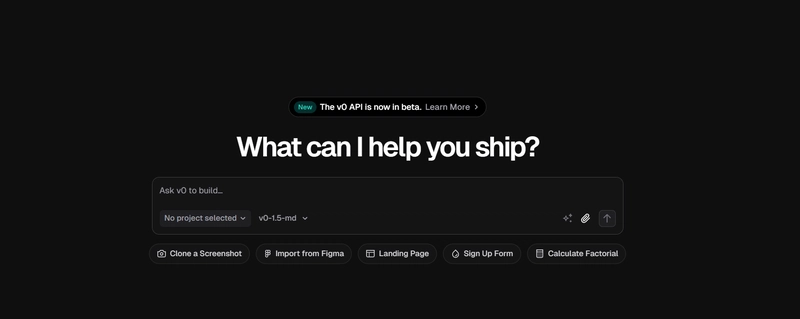
Overview: v0 specializes in generating UI components in the popular shadcn style, offering a vast collection of templates and Figma import features.
Key Features:
- UI component generation
- Extensive template library
- Figma import for design integration
Ideal For: Developers seeking quick UI solutions and seamless design-to-code workflows.
11. Replit AI

Overview: Replit AI is a versatile coding agent offering full-stack capabilities, native database support, and easy deployment options, catering to both beginners and advanced users.
Key Features:
- Full-stack development support
- Native database integration
- Mobile coding capabilities
Ideal For: Developers looking for a comprehensive, cloud-based development environment.
12. Augment Code

Augment Code is a powerful AI agent designed to work within popular IDEs like VS Code and JetBrains. Built specifically for developers, Augment can execute code, run terminal commands, find bugs, and provide intelligent code analysis. It’s an excellent choice for streamlining your development workflow with real-time assistance.
Key Features:
- VS Code and JetBrains integration
- Terminal and code execution capabilities
- Identifies performance issues and optimization suggestions
- Ideal for advanced developers
Ideal For: Developers aiming to replicate or build upon existing applications efficiently.
13. Mocha (BuildWithMocha)

Mocha is tailored for non-coders who want to build full-stack applications through simple prompts. It takes care of everything—authentication, database, hosting, emails—making it possible for anyone, even your grandma, to create production-ready web apps.
Key Features:
- No-code, prompt-based interface
- Generates full-stack applications automatically
- Includes auth, database setup, hosting, and emails
- Perfect for entrepreneurs and non-tech users
14. GitHub Copilot

Overview: GitHub Copilot is an AI pair programmer that suggests code snippets and entire functions in real-time, streamlining the coding process.
Key Features:
- Real-time code suggestions
- Supports multiple programming languages
- Integrates seamlessly with popular IDEs
Ideal For: Developers seeking to enhance productivity through AI-assisted coding.
15.Rork App

Rork is a text-to-app AI agent that focuses on building mobile applications with zero code. Its standout feature? Publishing directly to TestFlight. This makes it incredibly useful for quickly deploying test-ready apps from natural language instructions.
Key Features:
- Builds mobile apps via text prompts
- One-click TestFlight deployment
- No-code builder ideal for product testing
- Great for non-coders or startup MVPs
16. Clark

Clark is an AI agent built to help enterprises develop internal tools. It can take Jira tickets, apply prompt-based logic, and generate apps through a combination of coding, visual editing (à la Figma), and AI assistance. Perfect for streamlining internal development processes.
Key Features:
- Turns Jira tickets into functioning apps
- Combines Figma-like UI with code and prompt input
- Focused on internal enterprise applications
- Streamlines internal dev tasks and automation
17. Stitch (by Google)

Stitch is Google's AI-powered prototyping tool designed for speed and accessibility. It enables users to create functional prototypes rapidly, making it ideal for MVPs and early design iterations.
Key Features:
- Lightning-fast interface for building quick prototypes
- Simple enough for non-developers to use
- Built-in logic flows and UI elements
- Great integration with product design workflows
Ideal For:Founders, designers, and nocoders who want to build fast and iterate quickly.
18.Grok Studio (by X AI)

Grok Studio offers a fun and intuitive way to play with code. Created by X (formerly Twitter), it helps users—especially newcomers—understand and enjoy coding with AI support.
Key Features:
- Interactive code sandbox environment
- Real-time AI code suggestions and corrections
- Great for experimentation and learning
- Minimal interface with maximal support
Ideal For:Beginners, vibe coders, and anyone looking to learn programming in a more hands-on, assisted way.
19. Canva Code

Canva Code extends Canva's visual-first design experience to code, making it simple for marketers and founders to build interactive lead magnets or small tools with ease.
Key Features:
- Drag-and-drop UI building with code generation
- Exportable components for landing pages and interactive tools
- Friendly for non-technical users
- Deep integration with Canva’s design ecosystem
Ideal For:Founders, marketers, and nocoders creating lead magnets or simple interactive web tools.
20. A0.dev

A0.dev is a cutting-edge mobile-first AI coding agent designed to generate fully functional mobile apps from your mobile device. Unlike many web-based tools that create mobile app wrappers, A0.dev builds real React Native apps, enabling true native experiences. It’s ideal for fast, on-the-go development and prototyping.
Key Features:
- Mobile-first interface – Create apps directly from your smartphone
- Generates React Native apps – Not just web wrappers; true mobile-native output
- Powered by Claude 3.7 Sonnet – Delivers smart, fast, and accurate app generation
- Fast prototyping – Quickly test ideas or deploy to production
- Perfect for non-coders and indie developers – Intuitive and efficient
Ideal For:Mobile-first creators, indie developers, and entrepreneurs who want to build mobile apps directly from their phones—no laptop needed.
Conclusion
The rise of AI coding agents is reshaping how developers interact with code. From full-stack development to query generation and code review, these tools reduce friction and enhance productivity. Whether you're a beginner, a no-coder, or a professional developer managing large-scale applications, there's an AI agent designed to support your workflow.
Incorporating one or more of these tools into your development stack in 2025 can save time, improve code quality, and help you stay competitive in an increasingly AI-driven tech landscape.
Comments
Post a Comment